
The KPIs at the top of the Dashboard show your key figures for the period you choose at the top. If you also choose a store or a country there, the KPIs follow that choice.
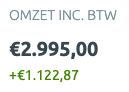
Amounts
- Revenue incl. VAT: your revenue plus VAT.
- VAT: the VAT amount on your revenue.
- Revenue: revenue excluding VAT from selling your products on bol.com, including corrections bol.com processes.
- Costs: the costs excluding VAT that bol.com charges you, such as commissions, shipping labels and lost goods. If you use LVB, the LVB costs count too. See which costs count in Costs by category.
- Returns: the amount bol.com withholds to refund customers who sent a product back. A return only counts once you have processed it.
- Profit: revenue minus costs, excluding VAT. This is your gross profit.
Counts
- Orders: the number of orders.
- Products: the number of products sold.
- Returns: the number of products returned.
- Return percentage: the number of returns divided by the number of products sold, times 100.
Up or down?
Under every KPI except VAT you see how much the figure changed compared with the previous period. That previous period is just as long and comes right before the period you choose. If you choose the last 7 days, for example, Zoloo compares with the 7 days before that.
For Costs, Returns and Return percentage, a decrease is good news.